MACOS 15+ · FIFINDERSYNC · APP SANDBOX

The Missing Context MenuActions in Finder

A lightweight native companion for developers, designers, and creators. Copy formatted paths, create folders and valid blank documents, and open targets with your favorite apps directly from Finder.

FREEFree v1.0 LaunchNATIVEBuilt with Swift & SwiftUISANDBOXMac App Store ReadyZERO-DATAZero Data Collection
RightMenuKit.app · FinderSync Preview
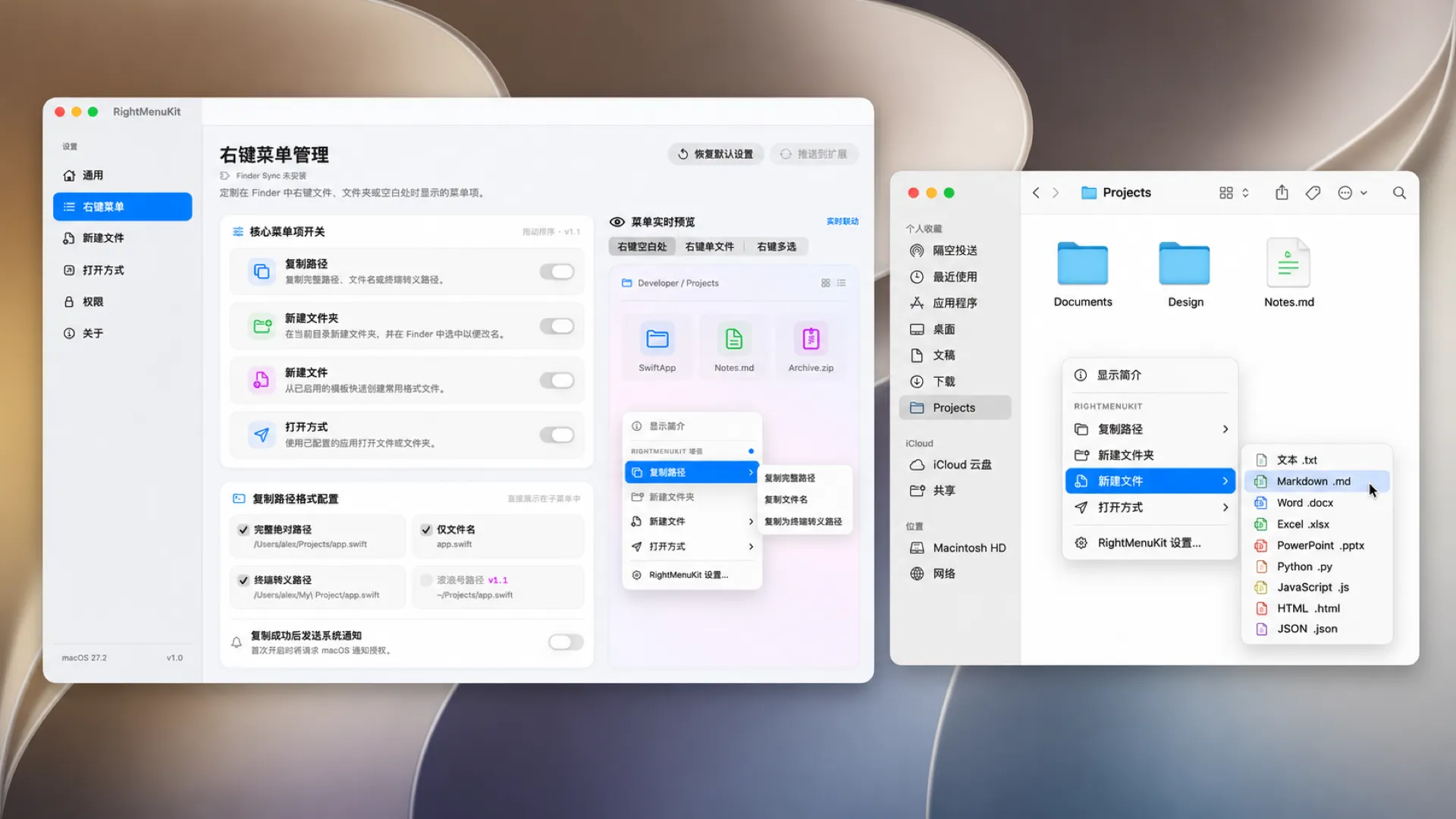
Side-by-side preview of the RightMenuKit settings window and macOS Finder context submenu
Live Settings Preview paired with the native Finder context menu (UI preview shown in Chinese)
01 · CORE CAPABILITIES

Four high-frequency workflows, refined for Finder

No bloated menus. Every action, path format, file template, and application entry is data-driven via AppConfig with instant toggles and sync.

COPY PATH

Copy Path: Ready for Terminals & Docs

Right-click files, folders, or empty folder space to copy paths cleanly. Works out of the box with zero folder write permissions.

  • Three v1.0 formats: Full Absolute Path, File Name Only, and Terminal-Escaped Path
  • Smart multi-selection: newline-separated for standard formats; single-line space-joined for terminal escaping
  • Optional post-copy notification (off by default; requests notification permission only when enabled)
Full Absolute Path/Users/alex/Projects/app.swift
File Name Onlyapp.swift
Terminal-Escaped'/Users/alex/My Project/app.swift'
NEW FILE

New File: Valid Templates, Never 0-Byte

Create clean documents right where you are. Office and RTF types use valid blank templates, and newly created files are auto-selected in Finder for instant renaming.

  • 10 built-in types in v1.0: txt, md, docx, xlsx, pptx enabled by default; rtf, py, js, html, json one click away
  • Built-in valid blank templates for docx, xlsx, pptx, and rtf; json initializes with {}
  • Add custom empty file extensions; default filenames follow app language (Untitled / 未命名)
v1.0 Built-in Presets (highlighted = enabled by default)
.mdMarkdown.txtPlain Text.docxWord.xlsxExcel.pptxPowerPoint.rtfRich Text.pyPython.jsJavaScript.htmlHTML.jsonJSON
NEW FOLDER & NAMING

New Folder & Collision-Safe Numbering

Create folders in empty space with atomic non-overwriting writes. Collisions automatically resolve to the lowest free index starting from 2.

  • Three separator styles: Space (Untitled 2.md), Underscore (Untitled_2.md), or Hyphen (Untitled-2.md)
  • File index is always inserted before the extension while keeping existing items untouched
  • Clear retry modal in the host app if a destination is read-only or out of space
OPEN WITH

Open With: Context-Aware App Launching

Configure IDEs, terminals, and editors with target rules (Files, Folders, Empty Space). On multi-selection, an app appears only when every selected item matches.

  • Unlimited apps in v1.0 with one-click discovery for VS Code, Cursor, Xcode, Terminal, iTerm2, Warp, Sublime Text, Typora, Obsidian, and WebStorm
  • Treats .app bundles as files, matching native Finder behavior
  • Unavailable or moved apps hide cleanly from the menu while keeping your settings intact; uses native NSWorkspace with zero shell execution in v1
02 · INTERACTIVE PREVIEW

Try the Finder Context Menu Live

Switch between three real Finder contexts, click Copy Path to inspect exact clipboard formatting, or test collision-safe file and folder creation.

Finder/Developer/My Projects
SwiftApp
Notes.md
Archive.zip
Context: Empty space inside a folder — all 4 action groups are active.
RightMenuKit Settings…
Action Output
'/Developer/My Projects'
03 · NATIVE UI & ZERO-POLLING ARCHITECTURE

Native SwiftUI Control Center, Zero-Polling IPC

The host app manages preferences, templates, and bookmarks, while the Finder Sync Extension constructs NSMenu dynamically. Changes propagate immediately via App Group storage and DistributedNotificationCenter.

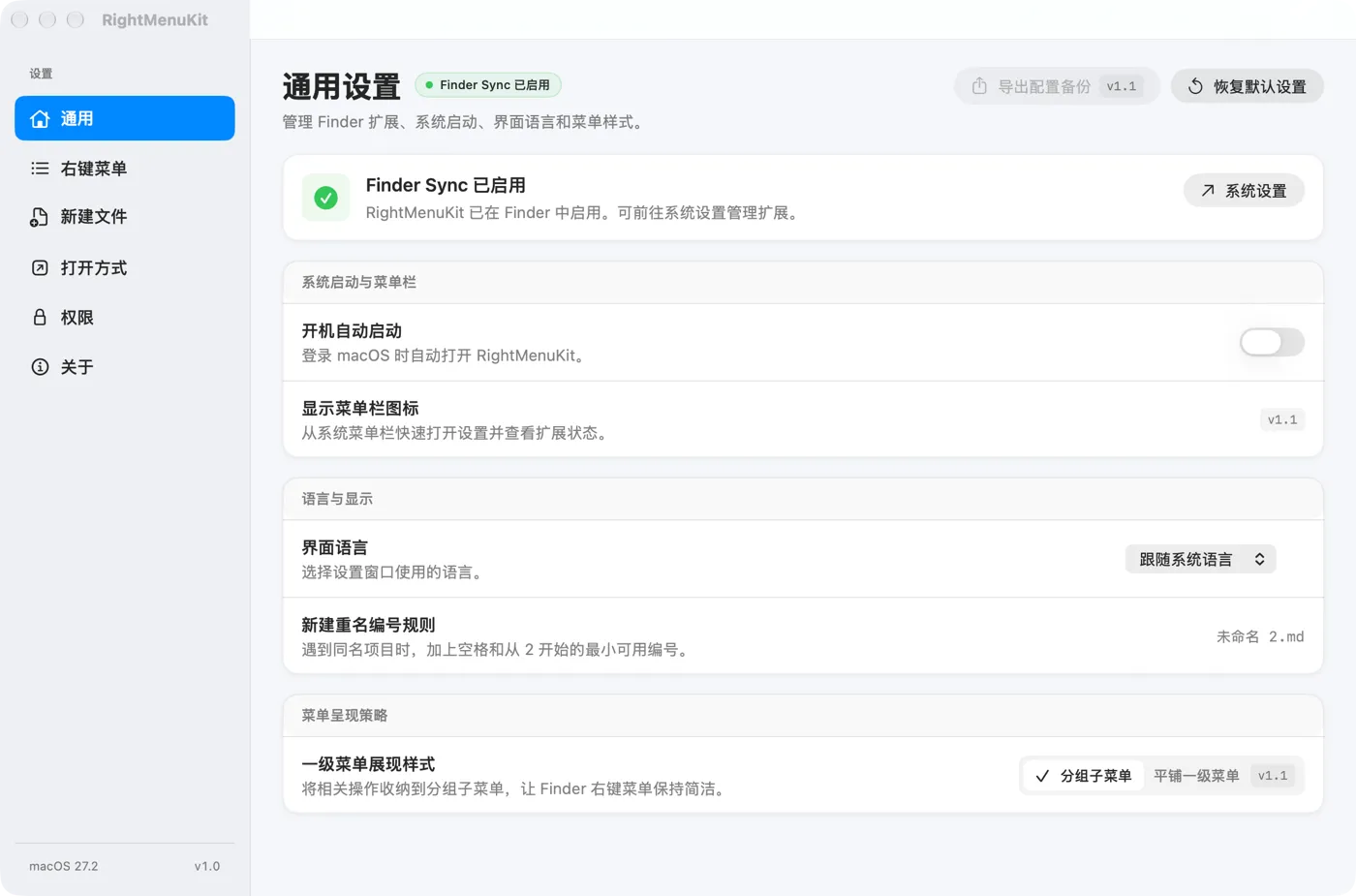
RightMenuKit General Settings window preview showing Finder Sync status, startup, language, and numbering rules
GENERAL & STATUS

General Settings & Extension Status

Detects Finder Sync status with a direct shortcut to System Settings. Configure Launch at Login, menu bar panel visibility, interface language, and duplicate numbering.

UI preview captured in Simplified Chinese; RightMenuKit supports both English and Simplified Chinese natively.

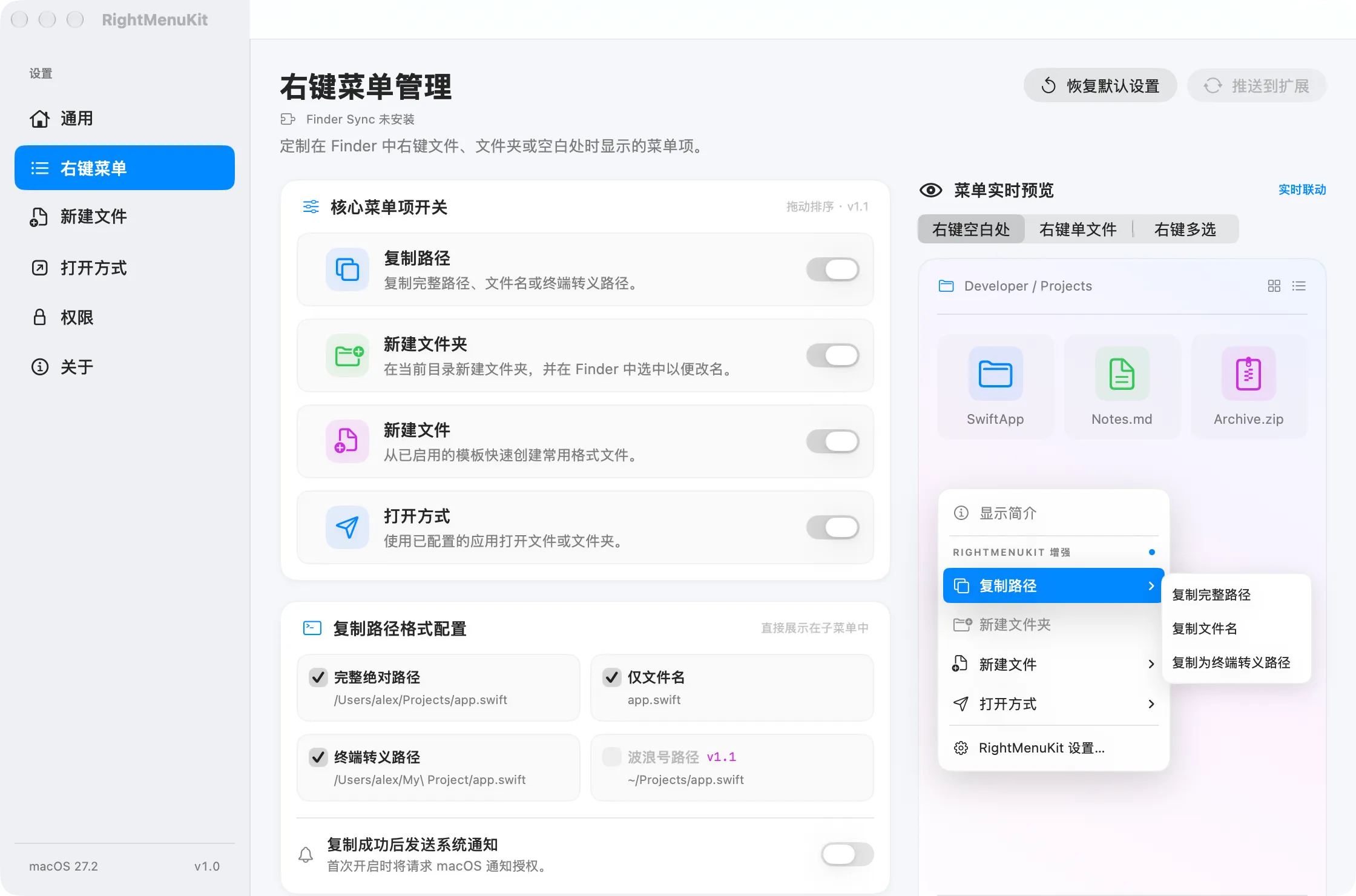
RightMenuKit Context Menu Management window preview showing toggles, path formats, and live menu preview
MENU & LIVE PREVIEW

Context Menu Manager & Live Preview

Toggle core menu actions and path formats on the left while inspecting live Empty Space, Single File, and Multiple Items menu structures on the right.

UI preview captured in Simplified Chinese; switches instantly with your chosen app or system language.

6 Settings Sections + MenuBarExtra Quick Panel

01General

Extension status, launch at login, menu bar icon, language, numbering

02Context Menu

Core action toggles, path format selection, copy notification

03New Files

10 built-in presets, category filters, custom empty types

04Open With

Installed app scanner, target & extension rules, relocate missing apps

05Permissions

Security-Scoped Bookmark validation and folder management

06About

Version info, privacy statement, App Store updates, diagnostics

Zero-Polling Cross-Process Pipeline

HOST APP

SwiftUI Host Application

AppConfig (schemaVersion 2) · NSOpenPanel authorization · Valid template loading · Retry alert on failure

SHARED BUS

App Group + DistributedNotificationCenter

Shared UserDefaults · Templates library · Security-Scoped Bookmarks · Instant push refresh

EXTENSION

Finder Sync Extension

Monitors / (all disks) · Dynamic NSMenu builder · Tag-bound selection snapshots

Copy Path executes directly inside the extension. Creation or authorization-gated Open With requests are queued by UUID in the App Group and seamlessly resumed by the host app.

04 · SANDBOX & PRIVACY

Built for Mac App Store Sandboxing & Zero Telemetry

Architected from day one around macOS App Sandbox rules so you stay in full control of every folder.

BOOKMARK

Scoped Folder Access — Never Requests Root /

Authorize your home folder or specific working folders via native NSOpenPanel. You can skip onboarding and still use Copy Path immediately; external, network, and iCloud volumes authorize on demand.

RESUME

Automatic Action Resume After Authorization

Triggering New File or Open With in an un-authorized folder opens the host authorization prompt and automatically completes your original action once confirmed.

NO SHELL

Zero Shell Execution in v1

Open With delegates strictly through native NSWorkspace document-open APIs—no shell scripts or sub-process command injection vectors.

LOCAL ONLY

Zero Data Collection or Analytics SDKs

No personal data, file names, paths, or hardware IDs are ever collected. Everything stays in your local App Group container, using only Apple App Store Connect crash reports.

05 · ROADMAP & RELEASE PLAN

Focused Free v1.0 Launch, Clear Evolution Ahead

Starting with a rock-solid, sandbox-compliant core—with every upcoming milestone and Pro boundary communicated upfront.

v1.0Free Launch · MVP

Essential Everyday Finder Workflows

  • Copy Path (Full Path, File Name, Terminal-Escaped)
  • New Folder & 10 built-in file types + custom empty files
  • Unlimited Open With apps with target filtering
  • Grouped submenus, launch at login, copy alerts, EN/ZH
v1.1Workflow Boost

Custom Templates & Layout Freedom

  • User-selected custom template files & extension filtering
  • Drag-and-drop reordering & Flat top-level menu layout
  • Live menu preview & date-named folders
  • Configuration import & export backup
v1.2Deep Integration

Toolbar, Sidebar & Template Variables

  • Auto-open newly created files with default app
  • Template variables like {{date}} and {{filename}}
  • Finder toolbar menu & sidebar context menu
v2.0Power Suite

Direct Edition Power Tools & Sync

  • Custom Shell commands (standalone notarized edition only)
  • Move To, Copy To, Toggle Hidden Files, Hash, Image Convert
  • iCloud configuration sync across Macs
DISTRIBUTION & PRICING

Distribution & Pricing Transparency

Release Order

Sandbox-first architecture: launching on the Mac App Store first, followed by a notarized Developer ID edition.

Free v1.0

All v1.0 features—including path copying, 10 built-in file types, and unlimited Open With apps—are completely free.

Future Pro

Upcoming Pro tiers (MAS StoreKit 2 / direct license) will unlock custom template files, template variables, extra path formats, and v2 file actions.

System Requirement: macOS 15.0 or later (Apple Silicon & Intel).

06 · FAQ

Frequently Asked Questions

Answers about enabling the Finder extension, folder permissions, templates, and release channels.

How do I enable RightMenuKit inside Finder?

Open General Settings in RightMenuKit and click "System Settings" to jump straight to macOS Extensions. Toggle on the RightMenuKit Finder extension, and your custom menu appears immediately in Finder.

Why does creating files require folder authorization while Copy Path does not?

Under macOS App Sandbox rules, reading and copying selected paths requires no write access, whereas creating new files or folders requires a Security-Scoped Bookmark for the target folder. You can skip initial folder setup and authorize working folders only when needed.

Why are Office files (docx / xlsx / pptx) not 0-byte empty files?

On macOS, 0-byte .docx, .xlsx, or .pptx files fail to open in Microsoft Office, WPS, or Quick Look. RightMenuKit bundles verified valid blank document templates so every new file opens cleanly.

Does it work on external drives, network shares, and iCloud Drive?

Yes. The Finder Sync extension monitors / to cover all mounted volumes. When you first create a file on an external, network, or iCloud volume, RightMenuKit guides you through authorizing that volume once.

How will the Mac App Store version differ from the direct notarized version?

Both editions share the same native core. The Mac App Store edition launches first with App Store updates. Custom Shell commands planned for v2.0 require leaving the sandbox and will be exclusive to the standalone notarized edition.

Does RightMenuKit poll the file system in the background?

No. The host app and extension never poll files. Configuration updates push instantaneously via DistributedNotificationCenter only when you change a setting.